Play any song in any key, at any speed. Remove vocals or instruments from audio.

| Name | Moises |
|---|---|
| Publisher | Moises Systems |
| Genre | Music & Audio |
| Size | 117MB |
| Version | 2.96.0 |
| Update | November 11, 2026 |
| MOD | Premium Unlocked |
| Get it On | Play Store |
You load a song, tap once, and the app pulls it apart so you can hear the bassline on its own or sing over a track with no lead vocal. That is the everyday routine with Moises MOD APK, which opens the paid tier without a subscription.
Moises at a glance
- Type: AI audio and music practice app
- What you do: split songs into vocals and instruments, change tempo and pitch, and export the results
- Developer: Moises Systems
- Size: 117MB
- Suits: singers, instrumentalists, DJs, students and anyone who wants to play along with recorded music
My take: this is a tool you use rather than a game you play. It pays off if you practice regularly, because the value comes from repeating a hard section until it sticks. If you only want to hear a song once without vocals, you will use a fraction of what is here.
Main features
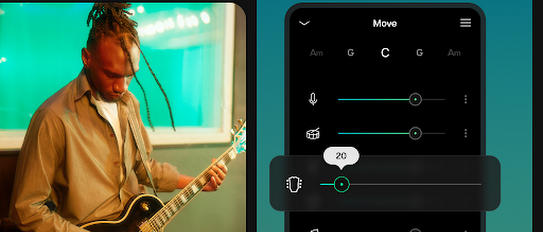
The core of the app is its AI separation. You give it a track and it divides the audio into parts such as vocals, drums, bass, guitar, piano and a group of leftover sounds. That lets you build a karaoke version, a backing track for your own instrument, or a set of stems to remix.
Practice tools sit around that core. You can speed a song up or slow it down, shift the pitch to suit your voice, and generate a metronome or click track to keep your timing steady. Chord detection shows visual cues as the song plays, which helps when you are learning by ear or jamming with friends.
When you are happy with the result, you can save the separated tracks as WAV or MP3 files. The description says there is no watermark and no quality loss on those exports, so the files are ready to drop into other music projects.
What the MOD unlocks
- Premium Unlocked – the paid-plan tools are open from the first launch, with no subscription to set up. According to the app description, that covers unlimited splits, high-quality exports and an ad-free experience, so you can process as many songs as you like without hitting a limit.
Tips before you start
- Pick one song you know well for your first split, so you can easily hear how clean each separated part sounds.
- Slow a difficult passage down first, then raise the speed in small steps once you can play it without mistakes.
- Use the click track when you rehearse with a band or record a cover, so your timing stays consistent.
- Upload and process songs while you are online. Once a track is processed, playback and downloads work offline, so you can practice on the move.
Installing the APK
Download the file from this page, which is 117MB, so make sure you have enough free space. Allow installs from unknown sources when Android asks, and if the system reports a conflict, remove the original Moises app first. Then install the APK and open it to add your first song.
Questions players ask
Do I need to root my phone?
No. The APK installs like any other Android app and needs no root access or system changes.
Is it safe?
Files are checked before they are listed, which reduces the risk of a tampered download. No modded file can be promised risk-free, though, so install APKs only from sources you trust and keep your phone’s built-in protection switched on.
Can I use it without a connection?
Partly. You need internet to upload and process a song, but after processing you can play it back and download the stems offline.
Also available on our sister site: Download Moises from ModifiedMod – same app, a separate mirror with its own download links.
What's New
- Minor improvements
Download Moises v2.96.0 MOD APK (Premium Unlocked)
You are now ready to download Moises for free. Here are some notes:
- Please check our installation guide.
- To check the CPU and GPU of Android device, please use CPU-Z app
- Before starting a download, our system checks the download link to ensure that we provide you with virus-free apps/games. It is our duty to prioritize your safety and security.